You opened Claude. It asked what you needed. You typed something. It answered.
And then someone said "agentic" and you smiled and nodded and had no idea what they meant.
That's fine. Here's the decoder ring.
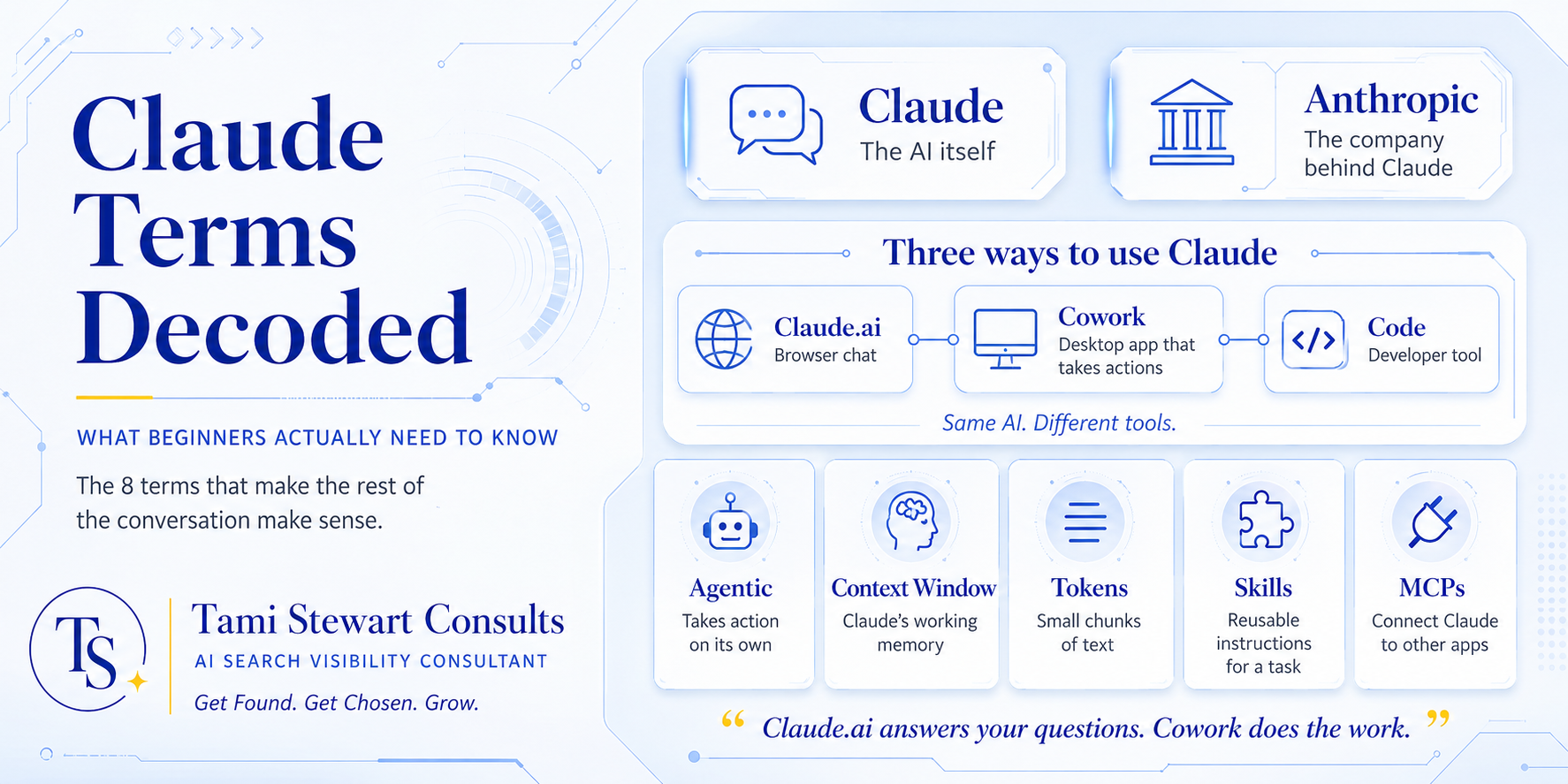
This is not an exhaustive tech glossary. It's the eight terms that actually matter when you're just getting started. The ones that will make the rest of the conversation make sense.
Term 01
Claude
Claude is the AI itself. The brain. Made by a company called Anthropic (more on them next). When people say "I'm using Claude," they mean they're talking to this AI, the same way people say "I'm Googling something." Claude is the thing.
Term 02
Anthropic
The company that built Claude. Founded by researchers who left OpenAI because they wanted to build AI that was genuinely safe and useful. They are serious about that. It shapes how Claude behaves — it's trained to be honest, to say when it doesn't know something, to push back when something seems off.
Worth knowing. Most people use Claude without knowing who made it.
Term 03
The Three Ways to Use Claude
This is where people get confused, so pay attention.
Claude.ai is the browser chat interface. You go to claude.ai, you type, it answers. One message at a time, like texting back and forth. This is where most people start.
Claude Cowork is the desktop app. This is where it gets interesting. Cowork can take actions — look through your files, do research, operate other programs on your computer. You give it a task. It works. You come back when it's done.
Claude Code is for developers. It lives in a terminal or code editor and can read, write, and modify code across entire projects. If you're not a developer, you probably don't need this one right now.
Same AI. Three very different tools. Knowing which one you're using (or which one you need) matters.
"Claude.ai answers your questions. Claude Cowork does the work. That distinction is worth understanding before you wonder why Claude isn't doing more."
Term 04
Agentic
This word gets used a lot. It means Claude is taking action on its own, not just answering a question.
Think of the difference between asking someone what they think about a plan versus handing them the plan and saying "handle it." The first is a conversation. The second is agentic. Cowork and Code are both agentic tools. You give them a goal, and they work toward it without you managing every step.
Term 05
Context Window
Claude's working memory. Everything in your current conversation — your messages, Claude's responses, any files you shared — lives in the context window.
It's large but not infinite. If a conversation goes on long enough, earlier parts can drop out of that window. That doesn't mean Claude is getting dumber. The session has simply filled up its available memory. Start a new conversation and you're back to full capacity.
Term 06
Tokens
This is how Claude reads and writes. Not word by word — in small chunks called tokens. Roughly three quarters of a word each.
You probably won't need to think about tokens much unless you're running large-scale operations or managing costs. But when someone mentions "token limits" or "token costs," this is what they mean.
Term 07
Skills
A skill is a set of instructions that teaches Claude how to do one specific thing really well. Instead of explaining the same task from scratch every time, you build a skill once and Claude runs it.
I use skills constantly in my own work — one for writing in my voice, one for building content calendars, one for SEO. They're like trained assistants who already know the job before they walk in the room.
Term 08
MCPs (Model Context Protocol)
MCPs let Claude talk directly to other apps. Slack. Gmail. Google Drive. Instead of copying and pasting between tools, Claude can pull information from and push actions into those apps — if you've connected them.
The protocol is the bridge. The connected apps are the destinations. Once you have a few MCPs set up, the way Claude can operate across your whole workflow changes pretty dramatically.
That's eight terms. That's the vocabulary you need to follow most conversations about Claude without feeling like you walked into the middle of someone else's meeting.
There are more terms worth knowing once you get further in, especially if you start working with Claude Code or building more advanced workflows. The full glossary, including developer-specific terms and command references, is on the resources page.
Want the complete A-to-Z Claude glossary, including CLAUDE.md, Plan Mode, and slash commands?
Full Glossary →Quick answers
What is Claude?
Claude is the AI itself — the brain, made by Anthropic. When people say "I'm using Claude," they mean they are talking to this AI, the same way people say "I'm Googling something."
What is the difference between Claude.ai, Claude Cowork, and Claude Code?
Claude.ai is the browser chat interface — one message at a time. Claude Cowork is the desktop app that can take autonomous actions across your files and computer. Claude Code is for developers working in a terminal or code editor. Same AI, three different tools.
What does "agentic" mean?
Agentic means the AI is taking action on its own, not just answering a question. You give Claude a goal, and it works toward it without you directing every step. Claude Cowork and Claude Code are both agentic tools.
What is a context window?
The context window is Claude's working memory for a conversation. Everything in the session — your messages, Claude's responses, any uploaded files — lives there. It is large but not infinite. Starting a new conversation resets the window to full capacity.
What are MCPs in Claude?
MCPs (Model Context Protocol) let Claude communicate with other apps like Slack, Gmail, and Google Drive. Once connected, Claude can pull information from and take actions in those apps directly, without you copying and pasting between tools.
Not sure how AI tools fit into your business?
That's exactly what I help with. Book a free 20-minute call and we'll figure out where to start.
Tell Me What's Not Working →